
Gryffin EHS
Environmental, Health & Safety
Turn safety observations into accountable action.
A reporter photographs an unsafe condition, the system proposes the classification and a draft corrective action, a named owner takes a due date - and leadership sees closure discipline instead of a month-end summary.
- Built for
- Multi-site operations - plants, substations, construction and O&M
- Covers
- Observation to verified closure
- Roles
- Reporter, safety manager, action owner (APO), plant head
- Capture
- Image-first reporting, with AI-generated suggestions
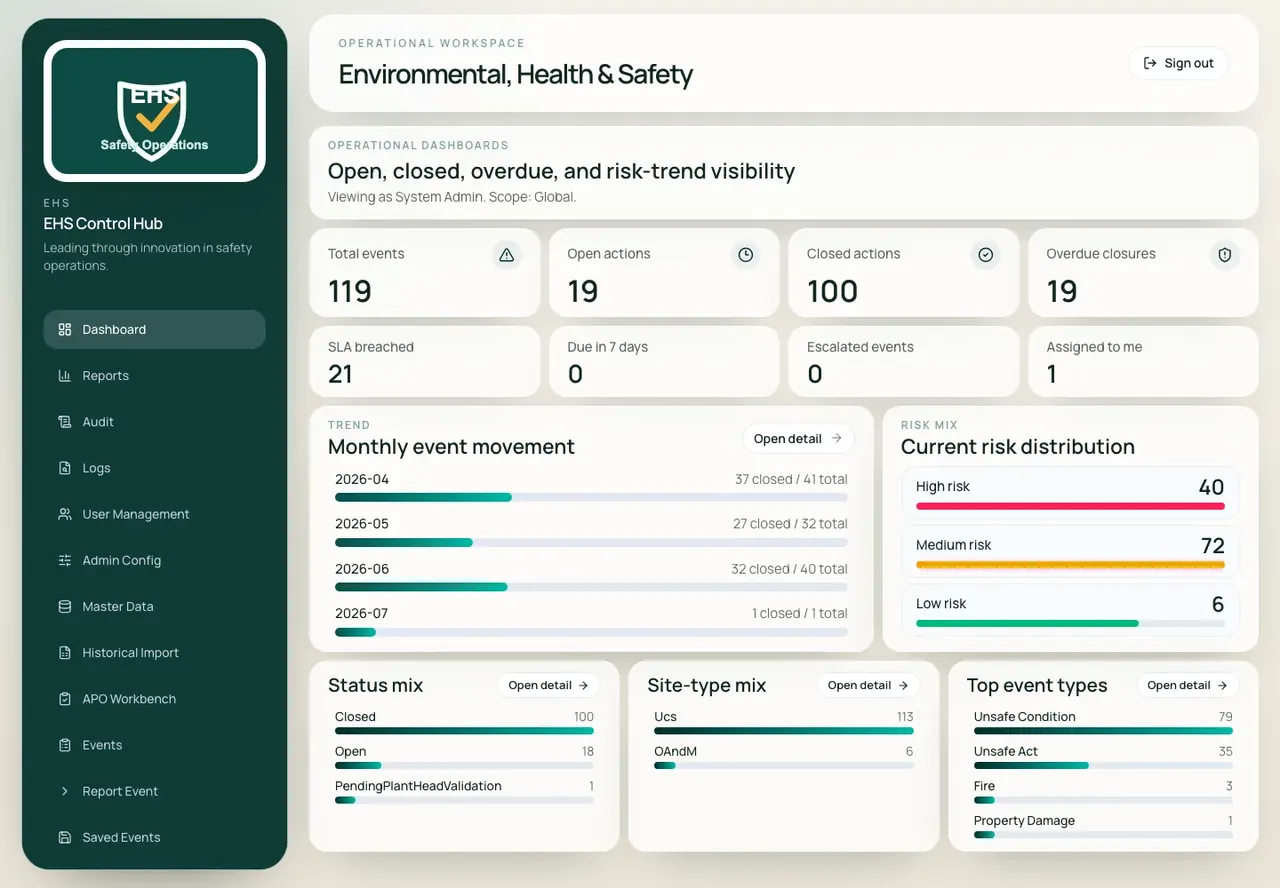
Operational dashboard - open, closed, overdue and SLA-breached work, with risk mix and event-type concentration on one screen.
The problem
By the time the risk is visible, it has already matured.
Most safety systems are honest and slow. The observation is written on paper at the site and typed up days later; the classification depends on who typed it; the corrective action is agreed verbally; and the trend is assembled by hand the night before the review.
Late
Observations captured days after the shift they belong to
Inconsistent
The same hazard classified three ways across three sites
Informal
Actions assigned in conversation, with no due date on record
Retrospective
Risk reviewed monthly, after the exposure has run its course
Lifecycle
Six steps, and a person accountable at each one.
The AI compresses the two steps that used to cost days - writing it up and classifying it. The steps that carry accountability stay with named people.
- 01
Observe
Reporter uploads site photographs before the rest of the form is shown.
- 02
Classify
Severity and probability set the risk level and due date; AI drafts the rest.
- 03
Assign
A named action-plan owner takes the action with an SLA-derived due date.
- 04
Act
Owner works the action from their queue and records what was done.
- 05
Plant head validation
Correction checked before the event is allowed to close.
- 06
Close
Event closed with full history, and folds into trend and cause analysis.
Modules
Four modules, from the phone to the board pack.
One record carries the photograph, the classification, the owner, the due date and the verification - and the monthly pack is generated from it.
Module · Events
Every observation, findable.
One registry of incidents and observations, filtered the way safety teams actually ask questions. Active work is separated from closed history without losing the operational context that makes a record useful.
- Active and closed lists separated, with counts on the tabs
- Filter by status, risk, site type, state, zone, event type, APO and reported dates
- Active shown, open work, closed and high-risk counts across the current view
- Search across incident number, plant, state, zone, event type and reporter
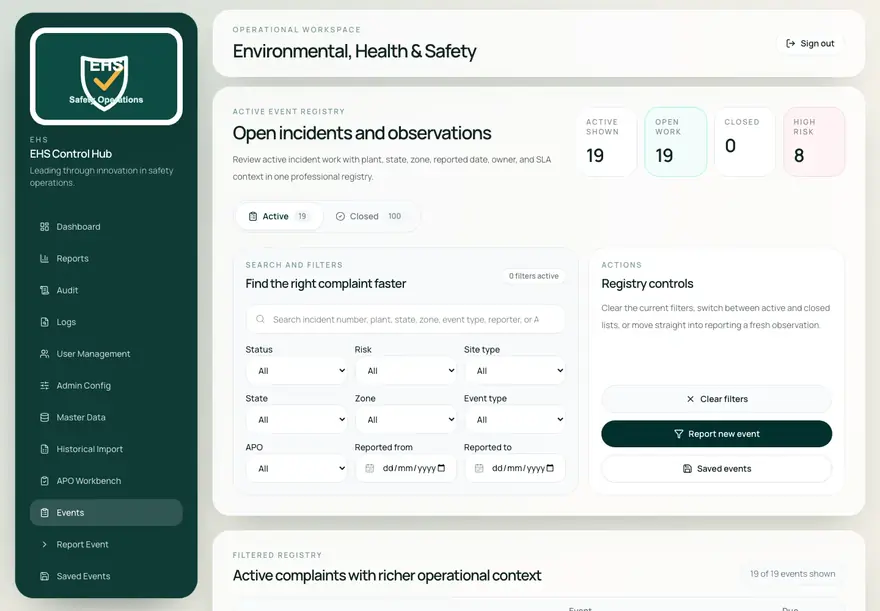
Active event registry - open incidents with plant, state, zone, owner and SLA context.
Module · Report event
Photograph first, type less.
Capture starts with the image, because that is what a person on site actually has. Images upload before the rest of the form is shown, and the risk level and due date are calculated as severity and probability are selected.
- Image upload as step one; large images compressed automatically
- No images available can be marked explicitly, and the form still proceeds
- Risk level and due date calculated from severity and probability
- AI-generated suggestions offered when images are supplied
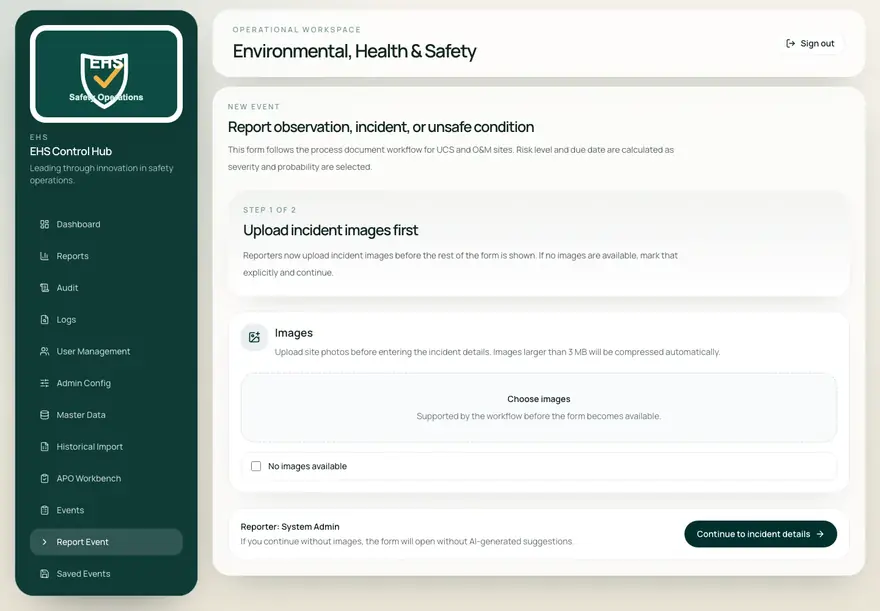
Report event - images first, because continuing without them means no AI suggestions.
Module · APO workbench
The action owner's own queue.
Corrective actions are separated from general reporting. An action-plan owner opens one screen showing what is assigned to them, what is overdue and what is due soon, and works each item from the action-owner prompt.
- Assigned, overdue, due-soon and closed counts across the owner's work
- Lapsed days shown per incident, alongside risk and due date
- Filter by status, risk, site type, category, due bucket and reported dates
- Action-owner prompt for investigation, updates and closure
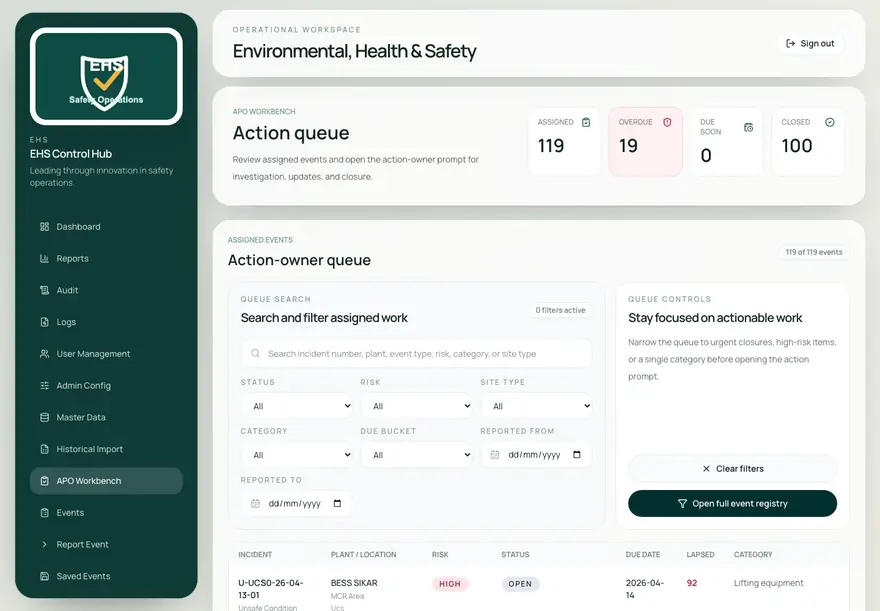
APO workbench - the action-owner queue, with lapsed days against every open incident.
Module · Reports
The monthly pack, generated not assembled.
Report families keep related views together, so a review meeting does not mean scrolling the entire reporting stack. Exports cover the registers a monthly submission and an audit meeting actually need.
- Families for overview, plant summaries, action tracking, risk and cause, and daily operations
- User access views covering roles, status and scope
- Event register, action plan and SLA breach exports as CSV
- Excel and PDF export for submissions and audit-ready documentation
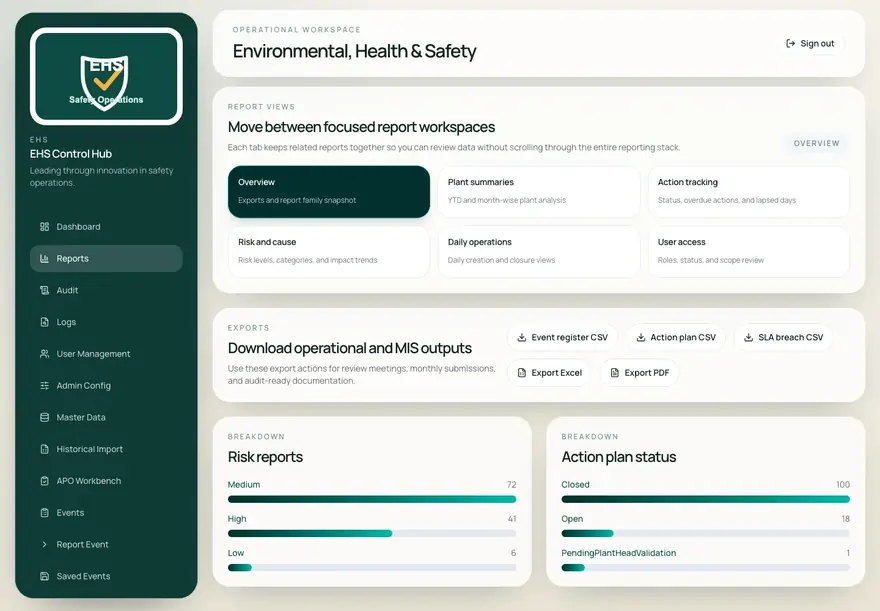
Reports - report families with the exports a monthly submission and an audit meeting need.
What changes
The arguments that stop recurring.
Richer events, reported sooner
Image-first capture means the observation is recorded during the shift it belongs to, with the visual context that makes it actionable.
Ownership you can see
Open actions, overdue closures, SLA breaches and per-owner queues make closure a measured discipline rather than a promise made in a meeting.
Risk that reads forward
Consistent classification across sites makes risk, cause and site-type analysis reliable enough to act on before an exposure matures.
Delivery
How it is deployed and supported.
Gryffin Global delivers this as an implementation, not a download. Configuration to your own process is part of the engagement.
- Deployment
- Cloud or customer on-premise
- Capture
- Image-first reporting with automatic compression above 3 MB
- AI
- Suggestion only - classification and closure confirmed by a named user
- Risk model
- Risk level and due date derived from severity and probability
- Hierarchy
- State, zone, plant and site type (UCS / O&M), held as master data
- Migration
- Historical import for events predating the rollout
- Exports
- CSV, Excel and PDF across the report families
- Audit
- Audit and log views across classification, assignment, validation and closure
Photograph one hazard and watch it close.
We will configure a site from your hierarchy and run an observation end to end, from the phone to the monthly pack.
We respond within 12 hours